
Your Add/Edit experience is getting even better. These enhancements are designed to reduce price entry errors, improve accuracy, and streamline your workflow.
What’s New
Price Validation Enhancements
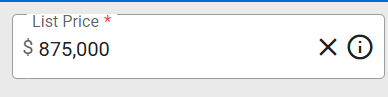
- All currency-related fields in Add/Edit now display with commas for clearer readability.
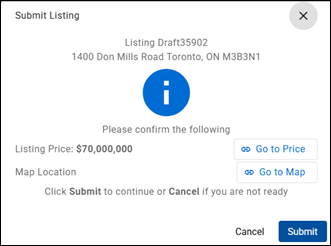
- A validation message will appear before you submit a listing to confirm both the List Price and Map Location.
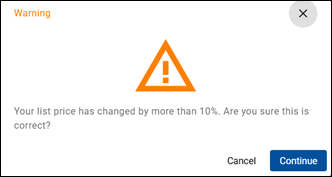
- When submitting a Price Change that differs significantly from the original list price, you’ll receive a validation prompt to confirm accuracy.
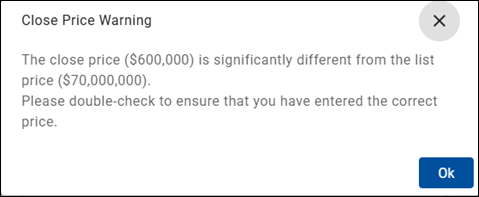
- When reporting a Close Price that varies greatly from the list price, another validation message will appear to help ensure accuracy.
Sold Listing Lockdown
To help maintain data integrity, sold listings will now be locked down to prevent:
- Deletion of photos and attachments.
- Editing of most sold listing fields.
You can still make limited edits when needed:
- From the Edit Listing tab, find the MLS® number.
- On the left menu, click Change Status.
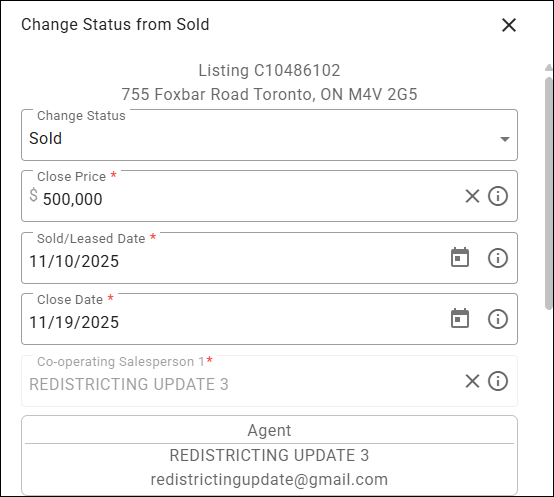
- From the Change Status from Sold dialog box, select Sold.
- Edit the necessary fields, then click Change.
Stay Up to Date
Log in to Add/Edit on or after November 18 to explore the new features and take advantage of enhanced accuracy and control.
If you have any questions, please contact the PropTx Help Desk:
- Email: support [at] proptx.ca (support[at]proptx[dot]ca)
- Phone: 416-443-8199