
LSTAR has learned that Members are concerned listings are "disappearing" from REALTOR.ca.
After further investigation, it appears that listings are being set to NO for the "Distribute to Internet" field in add/edit. If this is set to NO, it will not appear on REALTOR.ca.
Please ensure that when you are loading or editing a listing, these are set to YES.
If your listing is not appearing on REALTOR.ca, please check the "Other" tab in add/edit.
If you are unsure what these fields mean, you can click the information icon ⓘ for further details.
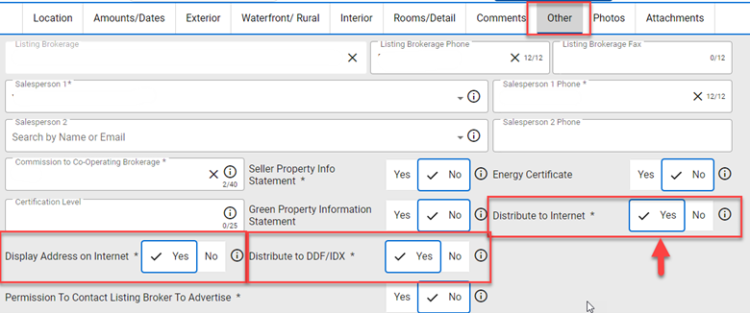
Here is a breakdown of what each means and how they interact with each other:
Distribute to Internet: If YES is selected, this listing will appear on public websites. If NO is selected, the listing will only appear in the PropTx MLS® System"
Distribute Address on Internet: This field is dependent on the selection made in the Distribute to Internet field. If Distribute to Internet is set to YES, and YES is selected in this field as well, the listing’s address will appear on public websites. If Distribute to Internet is set to YES, and NO is selected in this field, the listing, but not its address, will appear on public websites.
Distribute to DDF/IDX: This field is dependent on the selection made in the Distribute to Internet field. If Distribute to Internet is set to YES, and YES is selected in this field as well, the listing will be made available to participating brokerage IDX (Internet Data Exchange) sites and to CREA’s DDF (Data Distribution Facility). If Distribute to Internet is set to NO, the listing will not appear in IDX or DDF sites.
As a reminder, only listings from PropTx will appear on REALTOR.ca. As of June 4th, REALTOR.ca stopped pulling active listings from the ITSO MLS® folder as previously communicated. This also means that all ITSO MLS® Listings were removed from REALTOR.ca, and only PropTx listings will now appear.
Deleted Listings
LSTAR has only been deleting listings in the PropTx MLS® System if a Brokerage placed that request. When submitting a request, check the MLS® number, address, and that it is duplicated before emailing MLS®. If for any reason an error was made, PropTx will work with LSTAR to try and upload these listings from the last data pull, edits will be required.