
As a REALTOR® standing out and making a lasting impression are key. The all-new Branding Centre in Matrix™ allows you to showcase your brand seamlessly across Matrix™ emails, the OneHome client portal, and the Prospects Mobile app. This new feature lets you prominently display your logo, headshot, and brand colors where it matters most – right in front of clients. With the new Branding Centre, you can:
- Make it super easy for clients to recognize and remember you and your professional brand
- Ensure your brand is consistent across all three platforms with a single update
- Enhance your clients’ perception of your services and expertise by providing a professional, consistent, polished look.
Here’s How it Works
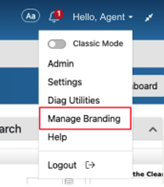
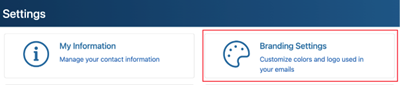
You can access the branding centre two ways:
- Open the top right profile menu and select Manage Branding
- In the Profile Menu > Settings page you will find a Branding Settings tile
Creating Your Own Brand
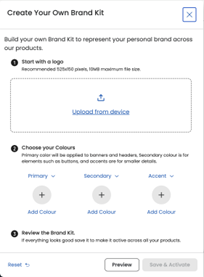
The Branding Centre allows you to upload your own Logo and set three colours for your brand look at feel.
What You Need to Know
- Cropping tools and colour pickers are available when you upload your logo.
- The Branding Centre will auto suggest the colours based on the uploaded logo.
- A preview of the branding is available.
- By selecting Save & Activate you will enable the branding across Matrix™, OneHome and Prospects Mobile app.
Resources & Support
- Visit the Matrix™ Learning Lab and explore videos, guides, and more.