
Whether you represent a landlord or a tenant, PropTx Verify™ powered by Cove helps you better guide your clients on both sides of the rental transaction.
This new powerful tool is a secure, all in-one tenant screening solution that delivers peace of mind for landlords, greater control for tenants, and strengthens your role as a trusted advisor. You can access PropTx Verify™ directly from the LSTAR Member Hub, PropTx Tools page, and links in REALM® and Matrix™, with comprehensive reports available starting at $14.95.
By consolidating credit, income, employment, rental history, background checks, and other key data into one seamless report, PropTx Verify™ powered by Cove reduces uncertainty and dramatically lowers the risk of fraud. Reports are delivered securely through the PropTx platform, ensuring landlords receive authentic information while protecting tenants’ confidential data from being emailed or shared across multiple channels.
PropTx Verify™ – A Smarter, Safer Way to Screen Tenants
This new service empowers REALTORS® and your clients with a streamlined process for rental transactions:
- Landlords receive authenticated reports with verified income, rental history, and background data—reducing fraud and misrepresentation.
- Tenants share sensitive information securely and maintain control over how their data is accessed.
Six Simple Steps to Get Started
- On the LSTAR Member Hub, click the PropTx Verify™ button under Dashboard Tools.
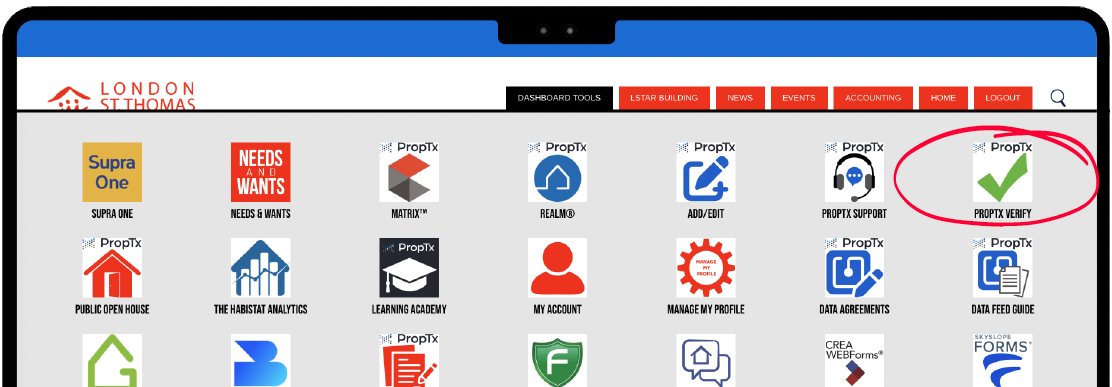
You can also access PropTx Verify™ in the Links menus in REALM® or Matrix™.
- Click the Invite User + button.
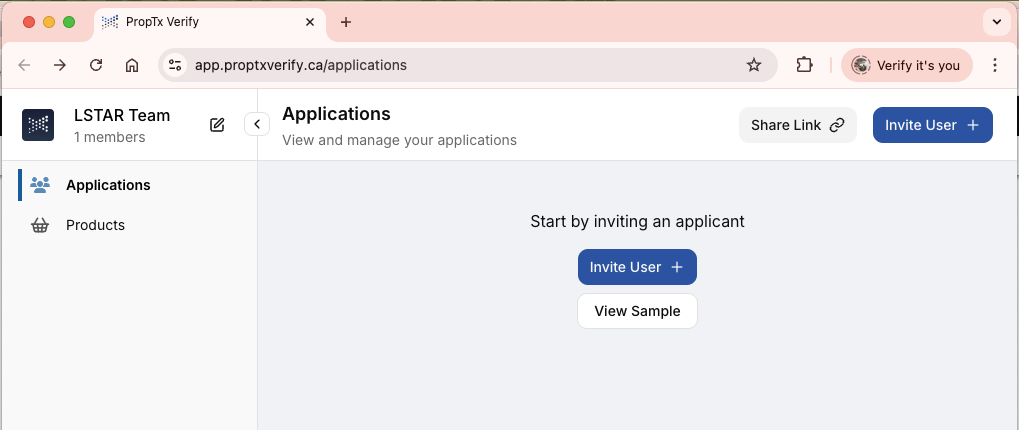
- Enter the prospective tenant’s contact information (name, email address, and mobile number) to send the screening request. The applicant will receive a secure link via SMS and email guiding them through the verification process. No login or account setup is required on their end.
- Add an active listing or enter an address manually.
- Choose who will pay.
- View the report once the prospective tenant has completed the verification process. A basic report is generated instantly, with the full results of scanning multiple sources available for downloading in less than half an hour.
After signing up for PropTx Verify™, you will receive a series of onboarding emails, including a welcome email, a getting started guide, check-in email, and tips and best practices emails.
What’s in the Report?
- Summary and Score Meters including credit score, rent to-income ratio, and monthly debt obligations.
- Employment Verification with direct payroll integration and supervisor reference checks.
- Income Verification includes transaction history, NSF and overdraft tracking.
- Background Checks scanning 100,000+ databases, eviction and rental court history.
- Identity Verification validates IDs and compares selfie to ID photo.
- Rental History & Verification includes landlord reference outreach, previous address verification, and star ratings for tenant behaviour.
- Complete Credit Report with all accounts, inquiries, and public records going back 7+ years.
Need Help?
Check out this helpful How-To guide with step-by-step instructions.
Still need help? Email Help [at] PropTxVerify.ca (Help[at]PropTxVerify[dot]ca).