
Over the coming weeks, members will see several enhancements across PropTx, REALM® and Supra One. Updates include the launch of enhanced PropTx Maps with improved location searching, community insights and boundary overlays, a new REALM® release featuring improved search, printing and customization tools, and an updated Supra One lockbox experience designed to make lockbox access faster and easier. Additional new enhancements include water frontage measurement options that will allow listings to display frontage in either feet or metres, as well as new land lease fields to improve the accuracy and transparency of leasehold property information.
- Available Now: Report an Issue Button
The Report an Issue tool has returned to REALM® and Matrix, making it easy for members to report potential listing concerns directly to LSTAR for review. Reports can include policy references, listing field details, comments, and supporting documentation, and all submissions remain anonymous.
How It Works:
When submitting a report, be sure to:- Select the policy you believe may have been breached
- Identify the inaccurate listing field
- Include detailed comments
- Attach a supporting image or document when helpful
All reports submitted through the new tool are anonymous.
Matrix:
REALM:
Once received, the listing Board will review the information provided.
Please note that individual responses will not be sent following submission.
This is just one of many enhancements being made to improve the REALTOR® experience, and we're thrilled to see a long-requested feature making its return.
- Available Now: Water Frontage Measurement Options
Accurate measurements matter when listing a waterfront property. Now, users will be able to enter and display water frontage values in either imperial or metric units.
How to Enter Water Frontage
- Navigate to the Waterfront/Rural tab.
- Enter the measurement in the Water Frontage field.
- Select either Feet or Metres from the Water Frontage Unit dropdown.
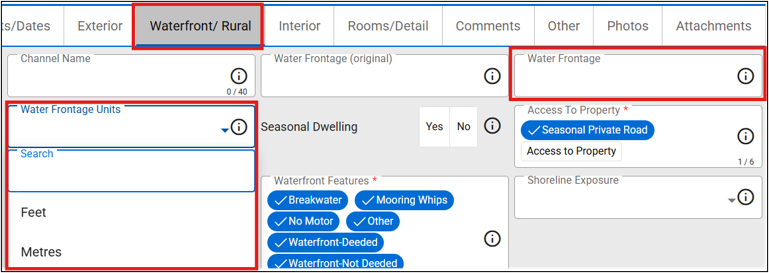
Important: Please review your current water frontage listings to ensure that they are accurately represented with the correct unit of measurement. Current active listings will default to Metres on both add/edit and the listing display.
To edit your Water Frontage Unit:
In Add/Edit, from the Edit tab, type the MLS#, then click search.
Navigate to the Waterfront/Rural tab.
- Select either Feet or Metres from the Water Frontage Unit dropdown, then click Save.
- Available Now: New Land Lease Fields
In Ontario, a leasehold or land lease is an arrangement in which the property owner owns the physical home, such as a house, mobile home, cottage, or other building, but leases the underlying land from a separate institutional, corporate, or private entity.
You must complete the new Land Lease field for all Freehold property listings. You may complete it for Condo and Commercial property listings.
Use the additional fields to capture key land lease details as you add or edit a listing.
How to List a Land Lease Property:
Go to the Amounts and Dates tab in the add/edit interface.
Locate the Land Lease field and select Yes.
Complete the following fields:
Land Lease Fee: Enter the lease amount.
Land Lease Payment Frequency: Select the payment frequency, such as monthly or annually.
Land Lease Expiration Date: Enter the date the current land lease agreement expires.
Matrix and REALM® display these fields in all listing detail reports, as shown in the following example.
Use the Land Lease field to search listings, as shown in the following example.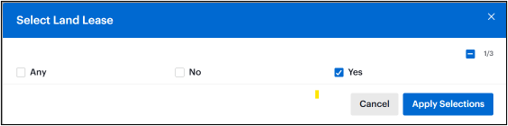
- Expected: October 13, REALM® Release
The next REALM® release introduces several enhancements designed to improve usability, searching, and reporting functions.
Beginning October 13, users will notice easier access to PropTx Maps, which have been moved from the Resources Links section to a more prominent location within the Resources page. The column customization experience has also been improved, allowing users to select multiple fields at one time when building custom column sets. Printing functionality has been enhanced with the option to display listing photo thumbnails in Table View reports, and basement searching now supports AND logic, providing more precise search results when multiple basement characteristics are selected. Additionally, listing links can now be shared using a shorter URL format, making them easier to send to clients and colleagues.
Full detailed breakdown available here.
- Expected: October 14, Supra One "Open Lockbox" Enhancement
We’re pleased to introduce the Updated “Open Lockbox” experience, designed to make opening a lockbox faster, easier, and more accessible for agents.
With the updated experience, agents can access Open Lockbox from the main navigation, open a lockbox in one tap, and receive clear guidance if the lockbox is not powered on. The updated experience launches October 14, 2026. There will be a forced app upgrade to ensure everyone has access to the improvement.
Open Lockbox is now more accessible with a floating Open Lockbox button available on every main navigation page. This makes it easier to start the lockbox-opening process without first navigating to another area of the app.
The My Lockboxes section has also been moved to the bottom navigation for easier access and discoverability.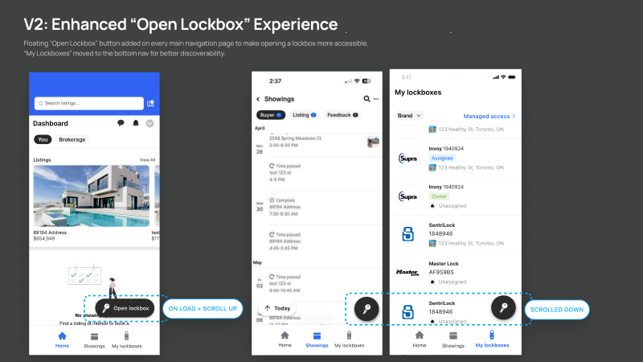
Opening a Lockbox
Opening a lockbox is now reduced to one tap. Once selected, Supra One begins communicating with the lockbox automatically. If the lockbox is not powered on, the updated experience provides clear, step-by-step guidance to help the agent activate the lockbox and its Bluetooth connection. Once the lockbox is ready, the app automatically continues with the opening process.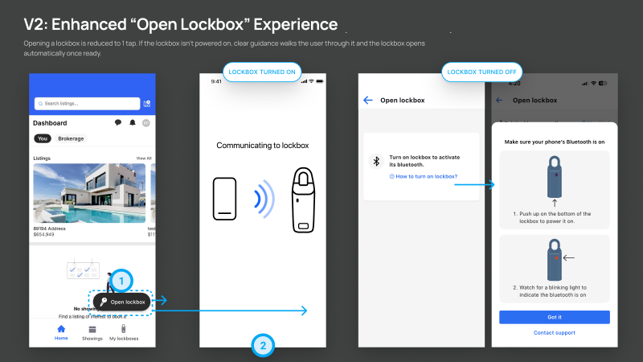
- Coming Soon: Enhanced PropTx Maps
Updated PropTx Maps will soon be available in OntarioMLP, Matrix, and REALM®. The enhanced mapping experience will provide improved location searching, community and municipal boundary overlays, points of interest, and access to community demographic and housing data to support more informed listing and search activities.