
The latest REALM™ update is now available, bringing new enhancements and features to improve your search experience and workflow.
Improved Search Options
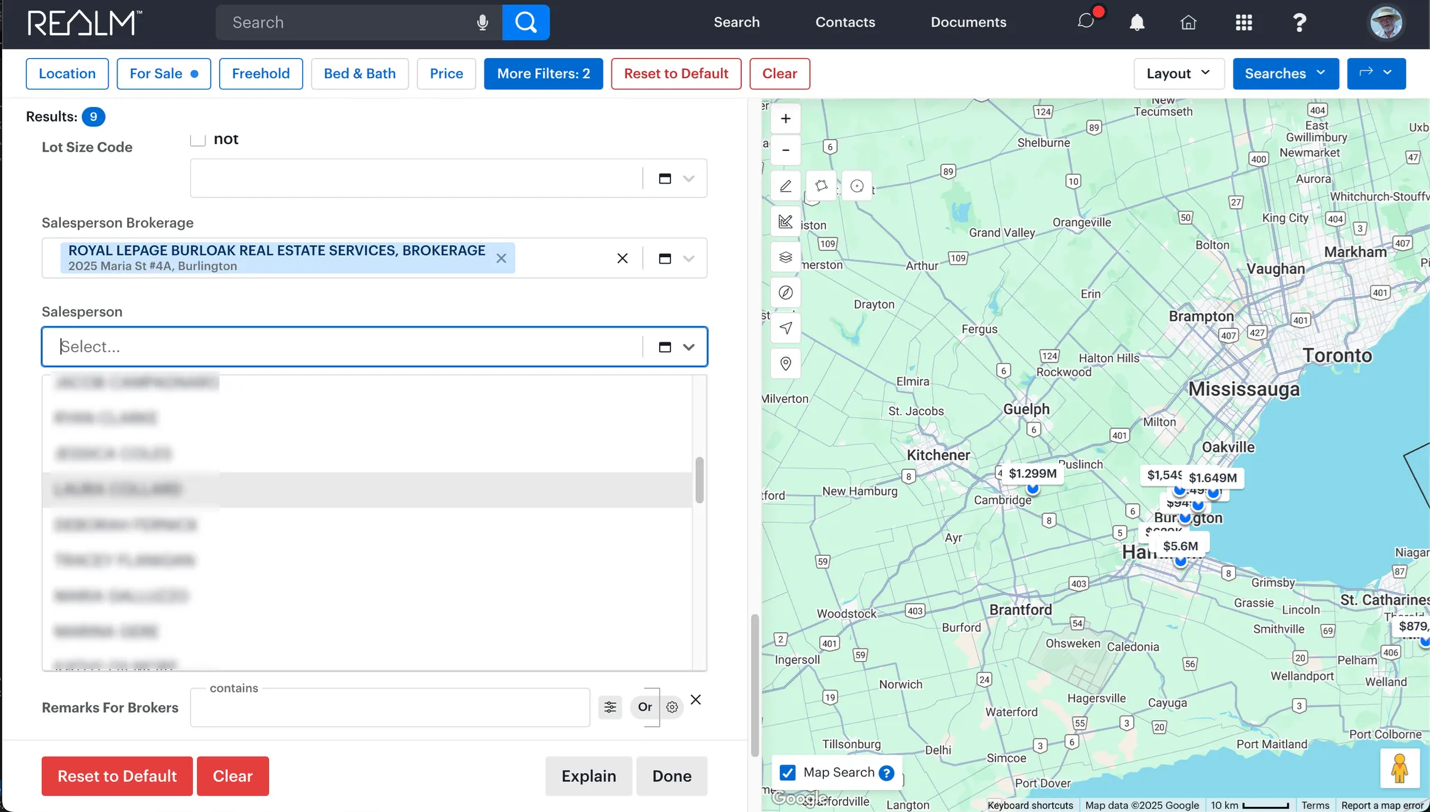
- Members can now search Available Listings by Brokerage and Salesperson. A Brokerage must be selected before choosing a Salesperson.
Enhanced Listing Display & Search Capacity
- Phase 2 Fields Now Searchable: Includes Under Contract Monthly Costs, Island, Seasonal Dwelling, Offer Remarks, and more.
- Phase 2 Fields Added to Broker Full and Broker Full Sheet Forms.
- Increased Search Result Limits: Members & Clients can now view up to 300 listings in a single search (previously 200).
New Features for Efficiency
- Copy Share Link in Listing Detail Views: Quickly generate a link and copy it to your clipboard.
- CMA Graphs: Hover over graph elements to see referenced property details.
- Multi-Select Icons Now Functional on iOS & Android: Previously non-functional on handheld devices.
Additional System Enhancements
- Brokerage and Member Roster Detail Views can now be printed or converted to PDF.
- Brokerage Roster Municipality now displays correctly in List View.
- Map Search Automatically Disables when narrowing search results to ensure consistency.
- New Narrow Action Behaviour: Users can now select listings across multiple search result pages.
Need Support?
Contact the PropTx Help Desk at 416-443-8199 or support [at] proptx.ca (support[at]proptx[dot]ca).